Mar 10, 2012

Configure OpenSim in Windows

OpenSim is the best free and open source server platform for hosting virtual worlds. While evaluating the game engines during the last week I noticed that OpenSim has been used in many researches. OpenSim works in two modes according to the perpose of the simulation. One is standalone mode and other is grid mode. In grid mode the service which is needed for the simulation, is not the part of region server process. Hence here the execution process is bit complex.

If you are new to OpenSim it is better to understand the simulation process in standalone mode first. When you are using OpenSim as a simulation engine you will have a good community support with strong documentation. Meantime you can reuse huge number of virtual objects and regions. Here are the steps of configure it in Windows.

  1. First you have to solve certain dependencies which OpenSim requires. As per current situation it is required .NET Framework 3.5 under windows. If you are using windows XP, be remember to update it at least Service Pack2.
  2.   Download the latest OpenSim simulator distribution.
  3. Unzip the package and go to /bin.
  4. In bin folder you will find OpenSim launcher.   (32-bit version of Windows: OpenSim.exe and 64-bit version of Windows: OpenSim.32BitLaunch.exe)
  5. As you are running the OpenSim for first time you have to set up a region and a user account. Give the proper answerer in the command prompt. These settings are written in to /bin/Region/Reagons.ini file.
Also note that you can give default as it suggested, if it is your first time with OpenSim installation.
  • New region nameThis is the name for your region.
  • Region UUID Unique ID of your region. You can keep the default value.
  • Region Location – This is the location of your region in the grid. You can safely leave these as the default (1000, 1000).
  • Internal IP address / Port IP address and Port to connect to your region.
  • One here onwards you can leave other parameters as default. But if you are using OpenSim 0.7 or later you need to create an estate manager account. In standalone mode you will ask to create an state manage account.  Don’t forget the account of the master avatar (in 0.6.9) or the estate manager (in 0.7 and later). These user accounts allow you to configure the in-world settings for your region and you can use the account to perform your initial login test. In addition to that you can create a user with ‘create user’ command other than an estate manager.
  • There are many 3rd party viewers to connect with OpenSim and view your region. Install one of them on your pc and lunch the viewer program. Before connecting make sure the server ‘OpenSim.exe’ is up and running. Enter first name, last name and password of the user account.


 Congratulations..!!! You just successfully log on to your own world. Now you can build up your own imaginations and be the master of your virtual arena. 

Feb 14, 2012

Microsoft Kinect for xBox360 Console


Microsoft Kinect, the project officially launch for xBox360 console. As you can see in the picture the main equipment is the Kinect sensor. Kinect SDK for Windows gives developers easy access to the capabilities offered by the Microsoft Kinect device connected to computers running the Windows 7 operating system and Windows 8 developer preview (desktop apps only).

It is easy to use. Basically you download. All you have to do is plunging the Kinect into a free USB socket and start programming. You can create applications in C#, VB or any .NET language including C++. Its only disadvantage is that it has a non-commercial licence which means you cannot use it to make any profit or even use it at all within a profit making organization.

Introduction to Hardware

There is a plug on the end of the cable that comes out of the Kinec. It is a proprietary connector designed to allow the Kinect to be plugged into the new black XBOX 360 without the use of an external power supply. Older XBOXes don't have the special connector and they come with an external power supply which has an adaptor to convert the Kinect plug into a standard USB connector and power supply connector.If you have bought a Kinect with a recent XBox as a bundle then you will need to buy the adaptor/power supply. At the moment these are only available from the Microsoft store.

Prices The initial retail price of Kinect sensor is about $149.00. But if you haven't xBox360 console you should considered abut xBox360 console and bundle pack.

Kinect Sensing

With Kinect for Xbox 360, you are the controller. Easy to use and instantly fun, Kinect gets your whole body in the game. Imagine controlling movies and music with the wave of a hand or the sound of your voice. With Kinect, technology evaporates, letting the natural magic in all of us shine. And the best part is Kinect works with every Xbox 360.
Kinect has following sensors to detect humans' activities.
  • Motion sensor 
  • Skeletal tracking 
  • Facial recognition 
  • Voice recognition 
What we can  with Kinect without xBox360? read

Jan 21, 2012

Virtual Object Interaction

I am really interesting on virtual reality concepts and its application. Therefore I thought to note down some knowledge, I gained while reading for my research. Please note that if you are using these details you must refer original papers in your publication. I just note down them in point form.

When you are navigating in a virtual world you may need to interact with virtual objects sometimes. Those objects may be dynamic or static virtual objects.

Let's consider a foot ball that you are given to play in a foot ball game. What are you going to do if the ball coming towards you? Depending on the team which you are playing, you will hit to ball along your desired direction. And what happen if you are the referee in the game? In that kind of situations you may need to grab the attention from team players and sometimes you also need to grab the ball.

Considering about an immersive virtual environment the situation may be different than previous example. Someone can argue that issuing an abstract command is sufficient instated using metaphors. But if the user is navigating on a immersive virtual environment, metaphors are needed to be interact with virtual objects in the VE. The virtual interaction can be described in two cases. Those are grabbing or selection and manipulation. In this article I discuss about virtual object grabbing and manipulation techniques which I encountered during the literature review in my research. 

Grabbing and Manipulation  

  • Arm Extension Technique 
When considering of a natural metaphor such as an arm user must be within the length of arm. In an arm extension techniques user is able to grow the virtual arm to the desired length.In this technique grabbing is easy but manipulation may be difficult due to virtual hand must be positioned within the object, which may be small or distinct.  
    •   Go-Go Technique
In this technique a virtual hand is moving in one-to-one mapping with physical hand of the user. At some point, say a threshold, the virtual hand is growing faster than physical hand. Therefore this technique allows user to reach objects which are situated at greater distance from the user. Another advantage of one-toone mapping area is user able to manipulate virtual objects as he does in the normal manner. Similar to this technique, another technique has been introduced which named as 'fast go-go' techniques. This has quick growing function of virtual hand in the no local area of the user.

  •   Ray Casting Techniques
 A virtual light is used in this technique to grab the attentions of a virtual object. The direction of the light should be along with users' hand.  Therefore grabbing task would be easy since user needs to pointing to an interested object. But using this method manipulation is become difficult.  
The major problem of this technique is called "lever-arm" problem. As the object is attached to the end of the ray, there is no way to rotate around the object except axis of the ray itself. And it gives 1 digree of freedom which rotation around the axis may be controlled. If user needs to move the object vertically he must also translate it and rotate it in another direction. 

  • Stretch Go-Go
In this technique the different constant growing speeds for the users' hand is assigned in three different regions. Using this techniques any length of the arm can be obtained. Only difference is in this technique user allows stretching his arm using arm motion controlling. If the arm is brought back virtual hand retracts in the same speed. This is cognitively challenging for the go-go technique but it does also allow for the arm to be placed at any distance. 
  • Indirect Stretching
In this technique user is able to stretch or retract his arm using two buttons of a 3D mouse.This is far away from natural metaphor of stretching the arm hence we cannot use this kind of technique for our research. But this technique is more precise and easy to use. 

  • Fishing Reel Metaphore 
 As earlier mentioned ray casting has certain limitation with object manipulation. This technique is an enhancement of ray casting technique. Using this metaphor user able to reel the object closer or further away with two mouse buttons. Therefore it would improve one additional degree of freedom of ray casting although it is indirect way of object selection.  

User Study
  • Indirect stretching and go-go technique was popular among users but it was noted some difficulties.
  • Users  almost  unanimously found  go-go to be the  most  natural  technique,  but  many  evaluators  preferred other techniques.
  • Indirect stretching was preferred by several subjects as it offers more precise control of the hand and less physical work on the part of the user. 
  • Due to lack of physical work has to be done ray casting with reeling was preferred by some of the user.
  • Almost every users are commented that ray casting is the best way to grab an object other than any of arm extension techniques. It requires no arm stretching and just need to point to an object and releases the mouse buttons while arm extension techniques one must place the hand within the object. Hence for grabbing ray casting is preferred. But non of them are easy to use for entire iteration: grabbing, manipulation and releasing.
Hybrid Approach

Based on user feedback, we have designed and  implemented  new techniques which  are  hybrids of the best features from  those discussed above,  but  still retain  ease of  use and  simplicity. These techniques use  ray-casting for  object grabbing  and  hand-centered manipulation, since these methods  were thought to be the easiest  to  use and  most efficient by almost all  subjects. We call this the HOMER  ( H and-centered
O bject M anipulation  E xtending  R ay-casting) technique.

sources

  • D. A. Bowman and L. F. Houges, “Formalizing the design,  evaluation,  and  application  of  interaction techniques for immersive virtual environments,”  Journal  of  Visual Languages and Computing, vol. 10, no. 1, pp. 37-53, Feb. 1999.
  • S.  Lee,  J.  Seo,  G.  P.  Kim,  and  Park  Chan-Mo, “Evaluation  of  pointing  techniques  for  ray  casting selection in virtual environments,” in Third International Conf.  Virtual  Reality  and  Its  Application  in  Industry, 2003, pp. 38-44. 

Jan 17, 2012

Head Tracking in Detail

Head tracking is one thing that should consider when implementing the interactive VR applications. It is needed to calibrate the users' head position and orientation.

  • Optical Tracking

In optical tracking it uses camera and video stream as the input. Then the video frames are enhanced by image processing techniques and identify the certain feature of the image using vision technology. So that this feature identification can be determine the head position and orientation.  This can be divided into two parts.

  1.  image feature based tracking

 Shape, color and organization of the organs in the face are considered as feature parameters in feature based tracking. Just to mention few examples are  Elliptical head tracking systems, example based head tracking system, color based head tracking systems using intensity gradients and color histograms.

  1.  Marker based tracking

Two or more cameras are using for 6DOF tracking.  Marker based tracking can be divided into two parts. They are active maker based tracking and passive marker based tracking. Both are using simple vision algorithms to calibrate head position and orientation. Active marker based tracking are accurate and fast and passive marker based tracking is simple and inexpensive. 

  • Wii remote tracking

Comparing with optical marker based tracking, Wii mote tracking is more accurate. And marker based tracking has certain limitation.
  1. Light condition may affected for accurate tracking
  2. Markers may got invisible.
  3. LED markers may be good but it is also confused with light illumination problems.
  4. Environment should not contain colors that related to markers 
Using four IR lights wii mote tracking can be done but dur to inability of identify IR lights separately can not get the orientation correctly.


  •  Head Tracking with Consumer Products 


  1. FAAST
FAAST is middleware to facilitate integration of full-body control with games and VR applications.  The toolkit relies on upon Microsoft Kinect sensors. includes a custom VRPN server to stream the user’s skeleton over a network, allowing VR applications to read the skeletal joints as trackers using any VRPN client. Additionally, the toolkit can also emulate keyboard input triggered by body posture and specific gestures. This allows the user add custom body-based control mechanisms to existing off-the-shelf games that do not provide official support for depth sensors.

FAAST is free to use and distribute for research and noncommercial purposes (for commercial uses, please contact us). If you use FAAST to support your research project, we request that any publications resulting from the use of this software include a reference to the toolkit .

  1.  Wii system
Nintendo completely redefined the nature of the competition with the release of its Wii system.  Comparing with xBox360 Nintendo's price is cheaper.

  • Sources
  1. J. D. Mulder, J. Jansen, and A. V. Rhijn, “An affordable optical  head  tracking  system  for  desktop  VR  /  AR systems,” in Proc.  workshop on Virtual environments 2003, pp. 215-223.

Aug 27, 2010

Remove the write protection of your pen drive

Hi all, today I'm going to share a worst experience which I have faced with my TDK flash drive. I'm using it for several months but it always pop up an error while I was copying or moving stuff. It says can not copping file and remove write protection... something like that.

please note that I'm not going tell that all the TDK pen drives have got this problem. But the thing is I haven't got this matter with other pen drives that I have already used :)
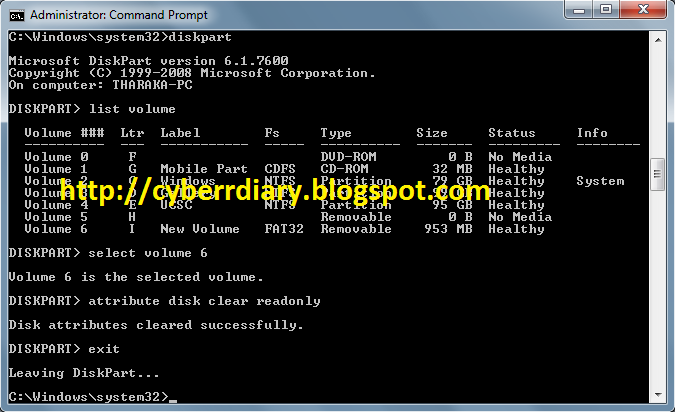
Anyway here is the way to remove the write protection your pen drive (it may be portable hard drive, ect)...I have played it on windows 7.

1) You will have to use administrative privilege in cmd.


2) Then enter following commands... (letters are case insensitive)

* diskpart
* list volume (This will show drive number, letter, label,ect )
* select volume 6 (if the volume number was 6 )
* attribute disk clear readonly
* exit


If all the things are done well, it will show "Disk attribute cleared successfully".

Aug 23, 2010

බලකොටුවේ අවසන් රාත්‍රිය...!

" සම්ප්‍රයෝගයට හේතු වන විප්‍රයෝගයක් "


බලකොටුවේ වටා රොක් වුණු නයිට් වරුණි,
රැස්ව සිටින සභිකයණි,
හදිසියේ පළකල නූලත දැක ඒ උඩ කොටා පැමිණියාට ස්තූතියි...!
කනගාටුන් වුනත් කියන්න තියෙනව දෙයක්,
උඹලා හැමෝටම...
අද තමයි බලකොටුවෙ අන්තිම දවස...

හිටිව් හිටිව්,
එහෙව් කියපු මාව දාල දුවන්න එපා බොලව්...
බලකොටුවේ අන්තිම රත්‍රිය කියන්නෙ,
බලකොටුව නටබුන් වෙන දවස නෙමෙයි...

පොඩි වෙනසක් කරන්න සිද්ද වුනා...
ඇත්තටම මේ වෙනස විශේෂ කෙනෙක්ගේ ඉල්ලීමක්,
ඔව්...අහක දාන්න බැරි තරමටම,
මගේ තමයි වරද,
මම නිකමට බලකොටුව පෙන්නුවෙ,
කව්ද දෙවියනේ දන්නෙ ඒ නිසා මෙච්චර වෙනසක් වේවි කියල...
"බලකොටුව" හරි මදිලු,
වෙනස් කරන්නලු,
හැබැයි මට හිතෙන්නෙ ඒක ලස්සන වෙනසක් වේවි...

එහෙනම් හමුවෙමු,
මෙතැන් සිට,
දෙදිනක් ගිය තැන...
"සයිබර් අවකාශය සිත්තම් කරන"
සැබෑ වෙනසක් කරන්න,
උඹලාගෙන් අවසර...
හිතනව,
උඹලා මාව දාල නොයාවීයි කියා...!

Aug 9, 2010

මූණු පොත පෙරලන්න අලුත් විදිහක්...(Disgby as a better solution)

Pidgin,G-talk වගේ අපි භාවිතා කරන instant messaging application අතරට ආ නවතම සාමාජිකයා තමයි Disgby.තවමත් මේක බීටා version එක තමයි අපිට පාවිච්චි කරන්න පුලුවන්කම ලැබිල තියෙනෙ.License ගැන කිව්වොත් Proprietary software license , ඒ කියන්නෙ software එක භාවිතා කිරීමේදී අපට අයිතිකරු මගින් අපට යම් යම් සීමා පැනවෙනවා.


කොහොම හරි මේකෙ තියෙන විශේෂත්වය තමයි එහි තියෙන සරල බව.ඒ වගේම අඩු දත්ත වැය කිරීමක් මගින් ඔයාගෙ මූණු පොතේ, ලියුම් පෙට්ටියෙ තියෙන ඕපා දූප ටික ඉතාම කෙටියෙන් පැහැදිලිව බලා ගැනීමේ හැකියාව.


උදාහරණයක් විදිහට ඔයා වෙනදට browser එක හරහා මූණු පොතට රිංගල එකෙ තියෙන News Feed,Photos,Links,Status Updates වගේ හැම දෙයක්ම Disgby හරහා ඉතාම ලෙසියෙන් බලා ගන්නත් comment කරන්නත් හැකියාව තියෙනව.


නිකමට හිතන්න මූණු පොතට ගිහින් අපිට මේ ටික පීරන්න යන වෙලාව ගැන...ඒ වගේම සෑම අවස්ථාවකම Browser එක Refresh වීමෙන් වැය වන අමතර දත්ත ප්‍රමාණය ඉතිරි කර ගත හැකි වීම... සතියට කීයක් හරි දාල 400MB-1GB වගේ අරගෙන net යන උදවියට,ඒක ගොඩක් වැදගත් වේවි ;)
Disgby බා ගන්න, මෙතැනට යන්න...